TeaHaus App
TeaHaus is is is a beloved local business based in Ann Arbor, MI that has been a staple for years in selling loose leaf tea and being a third space for community to gather and connect. This app is meant to help amateurs and connoisseurs alike in their tea enjoyment.
DURATION
Winter 2025
Revisited Winter 2026
ROLE
Product Designer
TEAM
Individual project
TOOLS
Figma
Problem Space
TeaHaus has quite the extensive collection of tea. Over 200 tins are stored on a large wall, and many people come in asking for recommendations. The lack of an in-store menu causes new customers to become overwhelmed. As a part-time sales associate, I wanted to improve the tea browsing and tracking experience.

Cara, "The Newbie," a 21-year-old student who doesn't frequently drink tea.
GOALS
Cara wants to buy a gift for her mom, who likes tea. She knows her mom likes green tea, but that's the extent of her knowledge. A friend recommended TeaHaus for their variety of interesting teas.
PAIN POINTS
Overwhelmed with the different types of tea presented in store
Difficulty finding information on tea tasting notes prior to entering the store
SHE SAYS:
"Whoa, it's my first time in here... you guys got a menu or something?"
"There's just way too many options, give me a moment..." (Nervous laughter)

Leon, "The Regular," a 38-year-old accountant who comes in every Tuesday and Thursday evening.
GOALS
Leon has a refined taste in tea, and wants to try every tea on the wall. He keeps a spreadsheet of what he's tried, and wants to find his favorite tea so that he can give recommendations to friends.
PAIN POINTS
Unsure what tea to try next
Difficulty keeping track of what he's tried and his opinions of them
HE SAYS:
"I got this last time and now I'm looking for something different but similar vibes, any recommendations?"
"I'm about halfway through trying all the teas, what should I try next?"
THE CHALLENGE
TeaHaus regulars are looking for a way to track the teas they've tried, haven't tried, loved, hated, want to try, and more. TeaHaus newbies are overwhelmed by the 200+ tea options and would like a way to filter through them more easily.
PROJECT GOALS
Based on the pain points of the customers that I interviewed and the personas I developed, here are the three main goals of this project:
Simplify the tea-browsing experience and integrate the tea wall into a "menu" format.
Allow tea lovers to track their favs and replace other tracking methods like spreadsheets.
Provide recommendations based on the user's personal preference or goals (like buying tea as a gift for someone else).
Design Solution
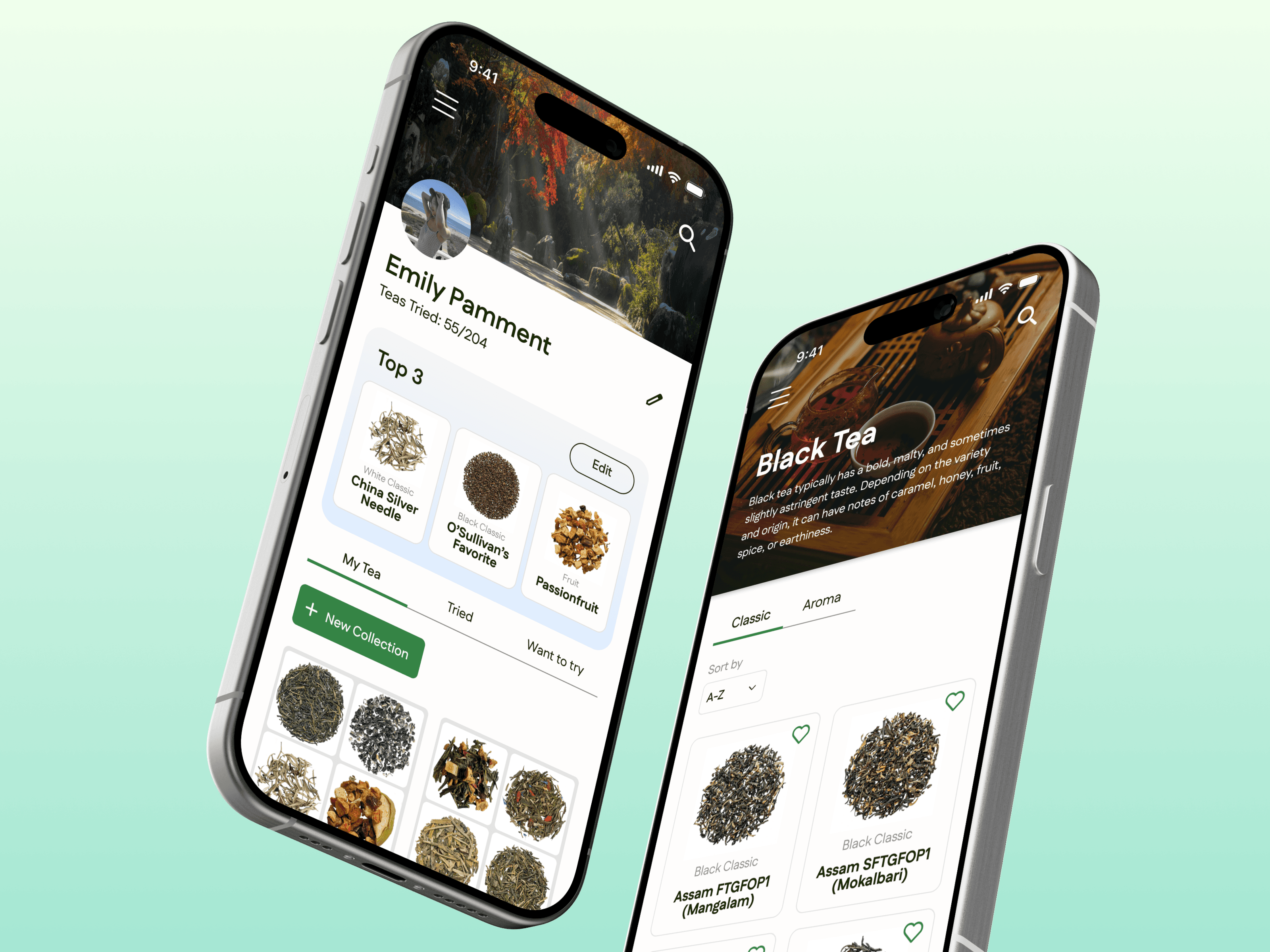
TeaHaus app is composed of three main pages — Browse, Profile, and Home. Each page is composed of various tea tracking and recommendation features to help the user find the perfect cup!
GOAL #1: SIMPLIFY THE TEA-BROWSING EXPERIENCE AND INTEGRATE THE TEA WALL INTO A "MENU" FORMAT.
Tea is organized into 9 categories, corresponding with the way they're arranged in store. In the Browse tab, users can find tea based on these categories, also split into caffeinated and non-caffeinated.

🔍 ORGANIZED CATEGORIES
All tea is organized by caffeine content and then further broken down into tea type (Black, Green, Oolong, etc.) This mirrors the process of tea categorization in store, allowing users to narrow down options and be equipped for in-store interactions.
🌿 CLASSIC VS. AROMA
Users can toggle between Classic and Aroma tea types within each category, simplifying navigation in comparison to the website.

📄 TEA INFO
Users can gather details such as tags, description, ingredients, and preparation instructions at a glance.
⭐️ INTERACTIVITY
Save tea to custom collections, rate them out of 5 stars, and add personal notes! This allows users to keep a record of their preferences for future reference.
💡 Impact: Simplifies information overload of the TeaHaus website, restructures information architecture and categorization to provide clarity to new users.
GOAL #2: ALLOW TEA LOVERS TO TRACK THEIR FAVS AND REPLACE OTHER TRACKING METHODS LIKE SPREADSHEETS.
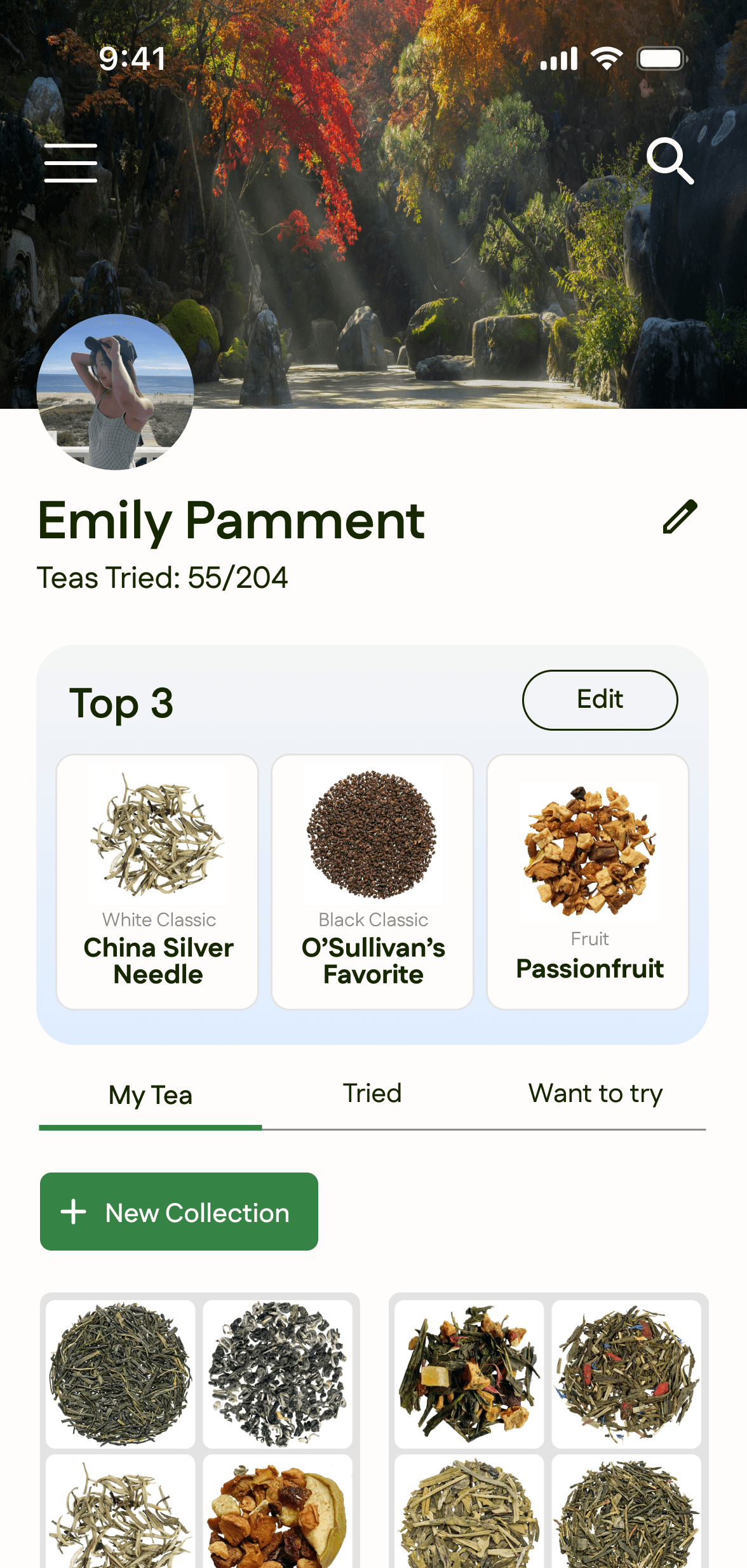
The profile page is comprised of several elements for users to track tea they like, tried, and want to try.
🏅 TOP 3
Users can display and edit their top 3 tea on their profile and make updates as their taste evolves.
🫖 MY TEA
Users have the ability to make custom collections for tea, similar to the functionality that playlists or moodboards serve for various moods, seasons, occasions etc.!
✅ TRIED & WANT TO TRY
Utilized to keep track of tea consumption.
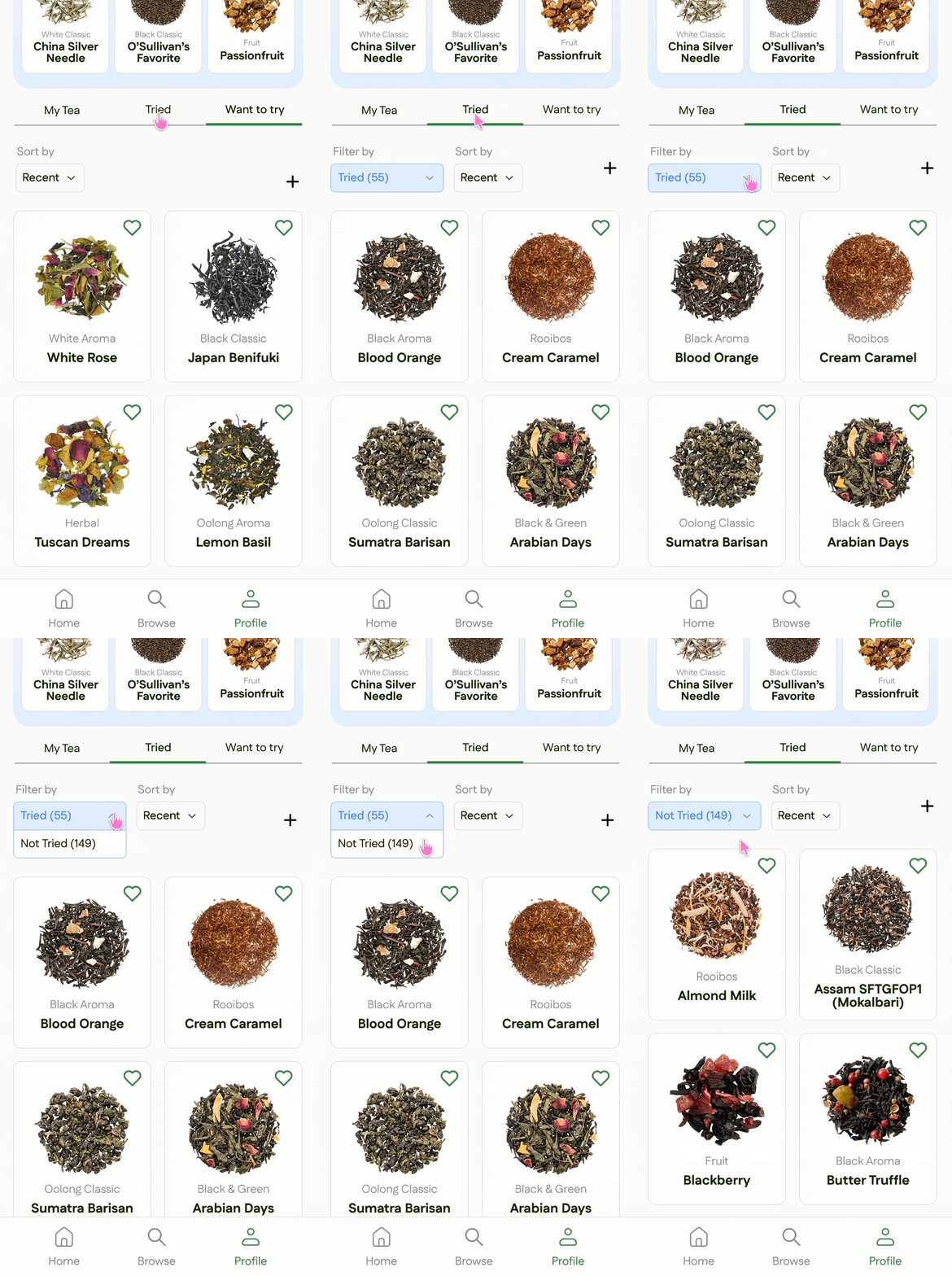
💡 Impact: Provides organizational method targeted towards regulars and tea-enjoyers.
GOAL #3: PROVIDE RECOMMENDATIONS BASED ON THE USER'S PERSONAL PREFERENCE OR GOALS (LIKE BUYING TEA AS A GIFT FOR SOMEONE ELSE).
The homepage showcases various recommendations and quizzes for tea, including popular, featured, tea quiz, random tea generator, about TeaHaus, and FAQ.

💡 FEATURED TEA
A new tea is featured weekly to encourage customers to try something new.
❓ ABOUT & FAQ
Learn more about TeaHaus's origin, hours, menu, etc. in these sections.

📝 TEA QUIZ
Finding the perfect tea is an art, and narrowing 200+ options down is a challenge. To help this, I created a tea quiz with the most popular questions we like to ask customers to help give them the perfect recommendation in a playful way.
💡 Impact: Shares a variety of resources that benefit both newbies and regulars, encapsulating TeaHaus's mission of helping out all customers.
Iterations
Originally, I started by referencing the TeaHaus website to integrate the information into an e-commerce app. Over several iterations, the visual design and function of the app evolved into a tea-tracking app with ways to explore and expand one's taste.
Streamlining the TeaHaus Website
Contains a full catalog of tea that can be bought in-store or online. The homepage features categories separated by Classic and Aroma tea types, which I aimed to consolidate under one category (e.g. Green tea) for smoother navigation.
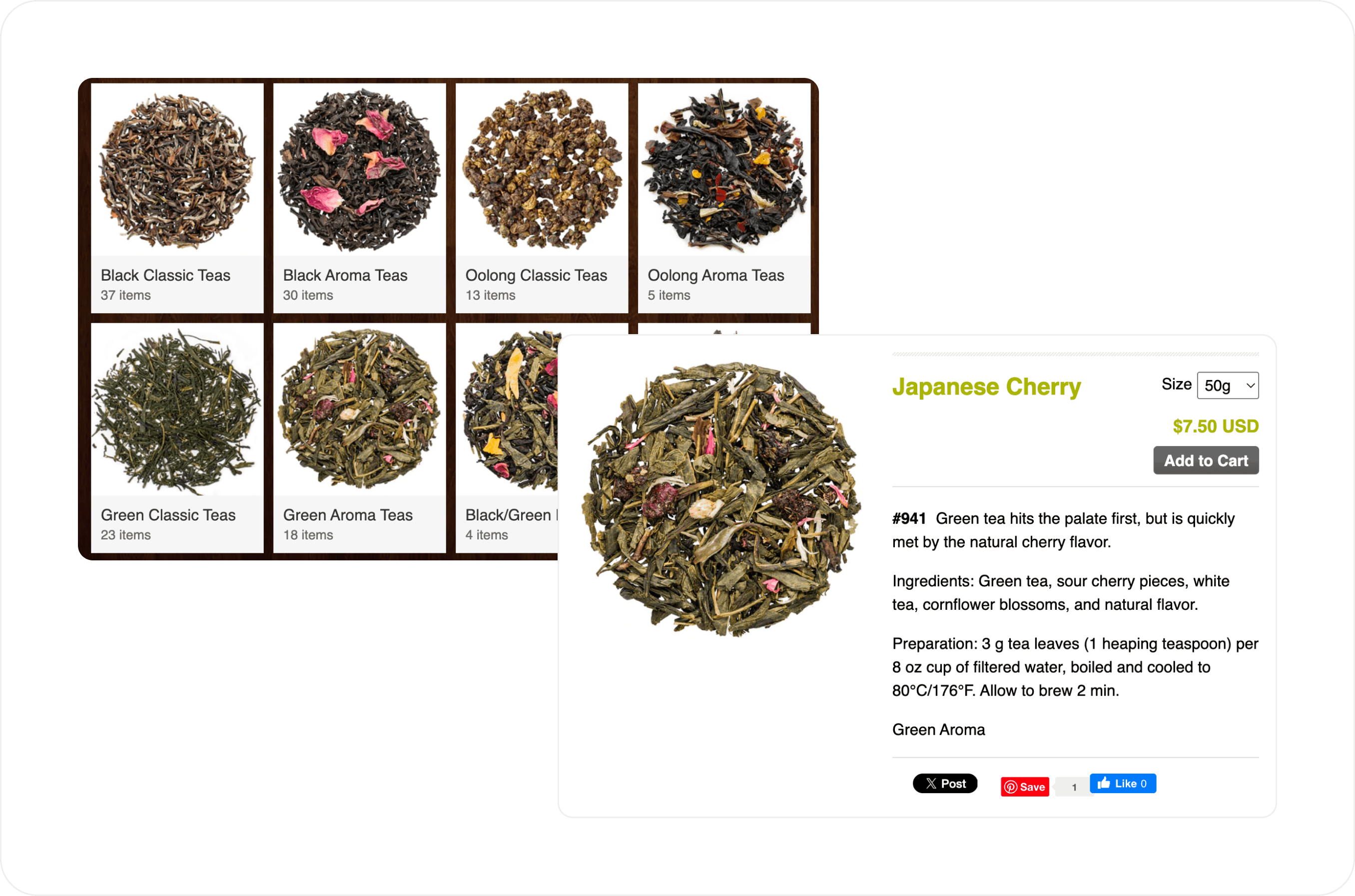
EARLY DESIGNS
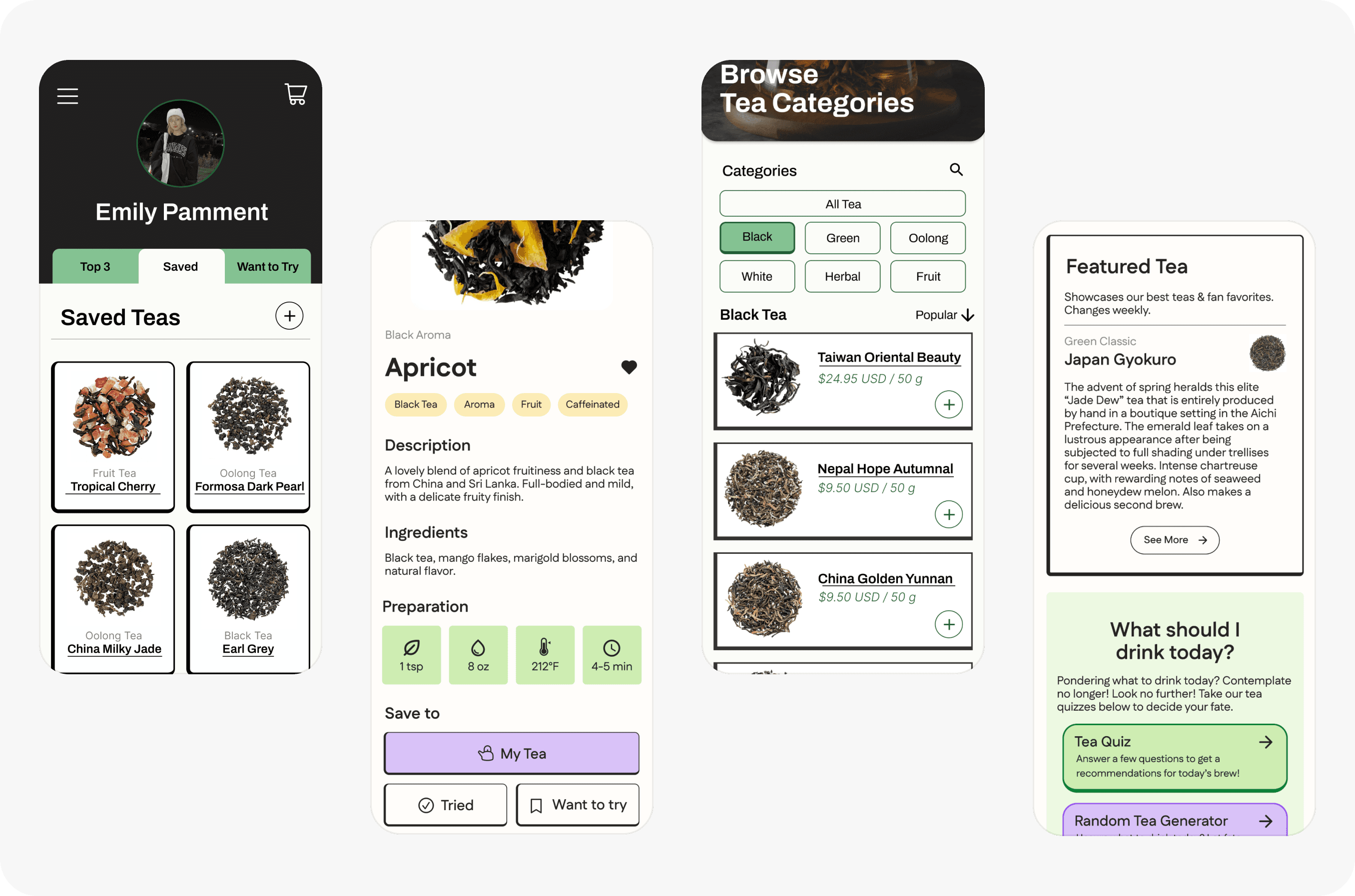
How user feedback informed the design iterations
Between customers, coworkers, classmates, and management that tested out my app design in its early stages, I gathered varied feedback that helped me establish a stronger niche visually and functionally. For example, removing the e-commerce feature allowed me to focus on elevating personalization and leave e-commerce to Shopify. Confusion surrounding "save," categories, and tags helped me focus on making flows more intuitive for users.
BEFORE & AFTER
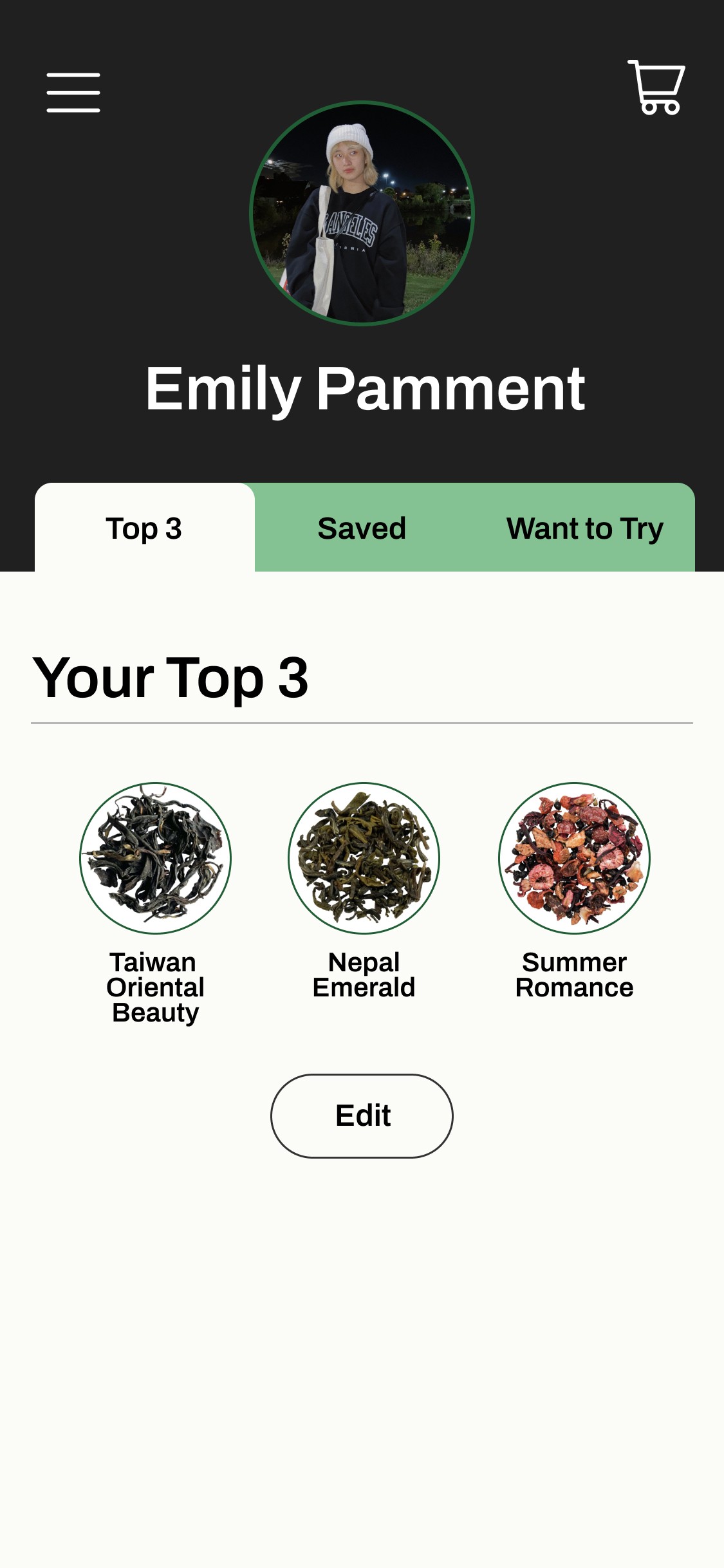
User Profile
ISSUES
❌ Limited information and grouping
❌ Visually sparse, not yet high fidelity
IMPROVEMENTS
✅ Created separate Top 3 section with visual cards
✅ Separated "Tried" and "Want to Try" for clarity, removed vague "Saved" section
✅ Ability to make a new collection
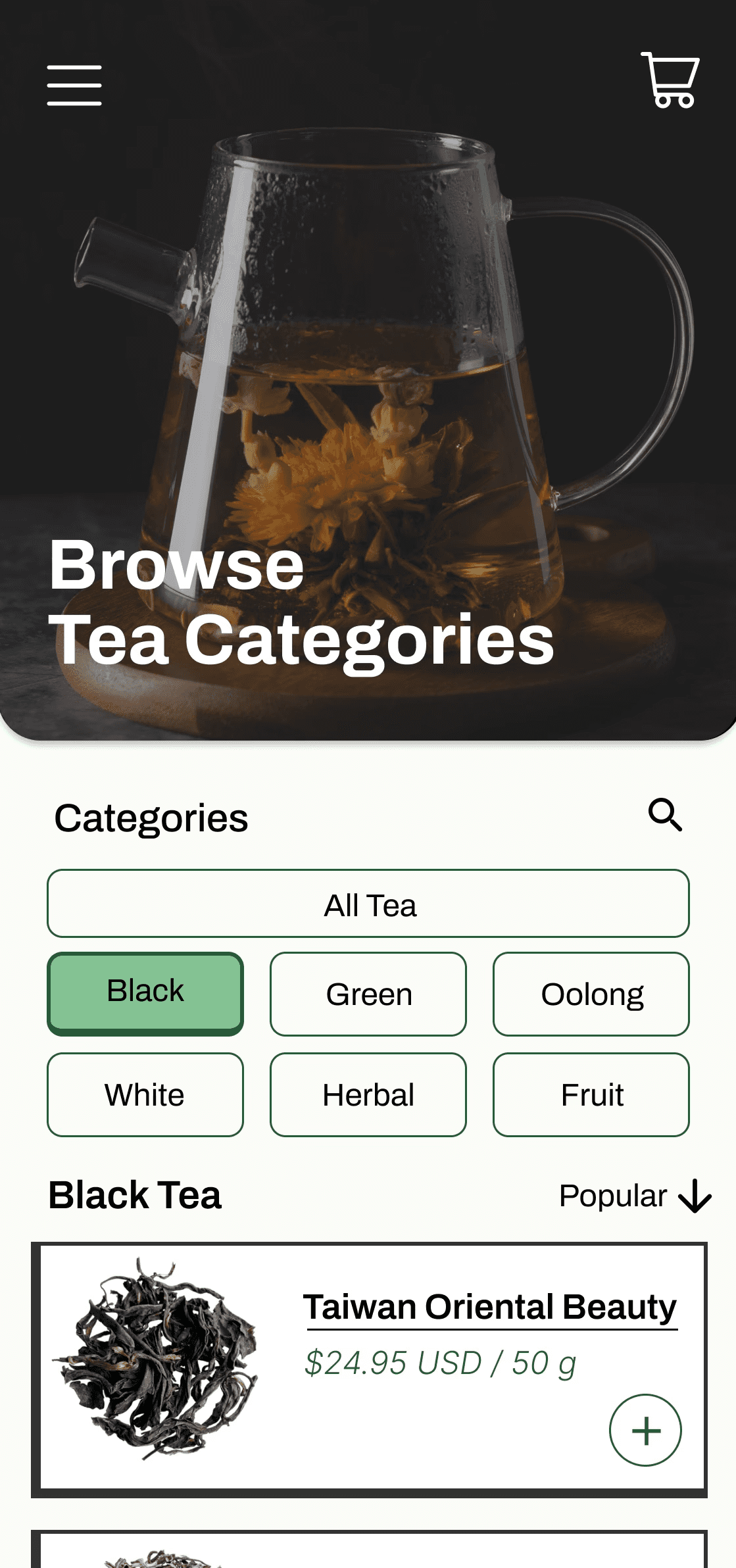
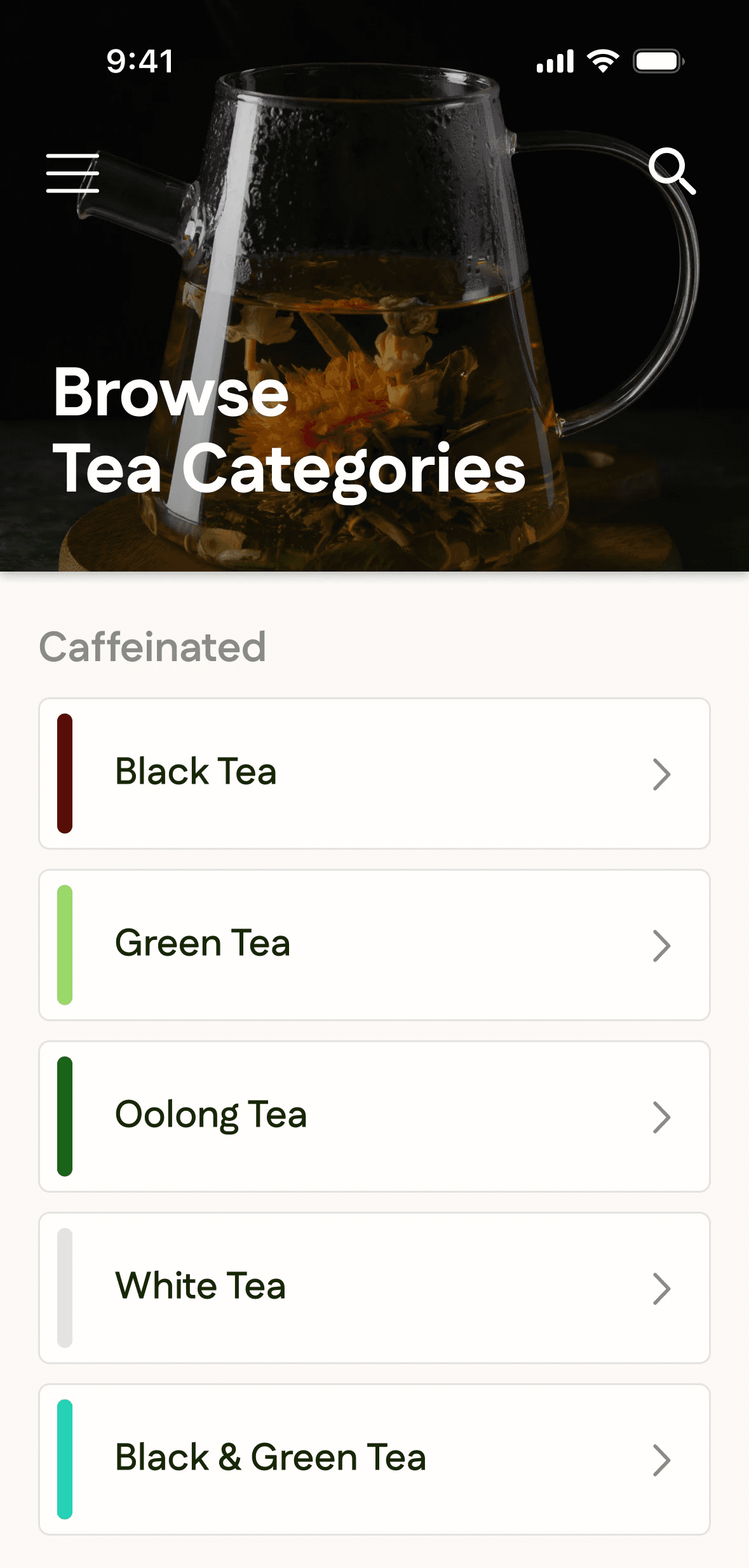
Browse Tea Categories
ISSUES
❌ Tea cards on the same page as categories
❌ Limited options
IMPROVEMENTS
✅ Assigned colors to each category corresponding to tea label colors in store
✅ Separated by Caffeinated and Non-Caffeinated
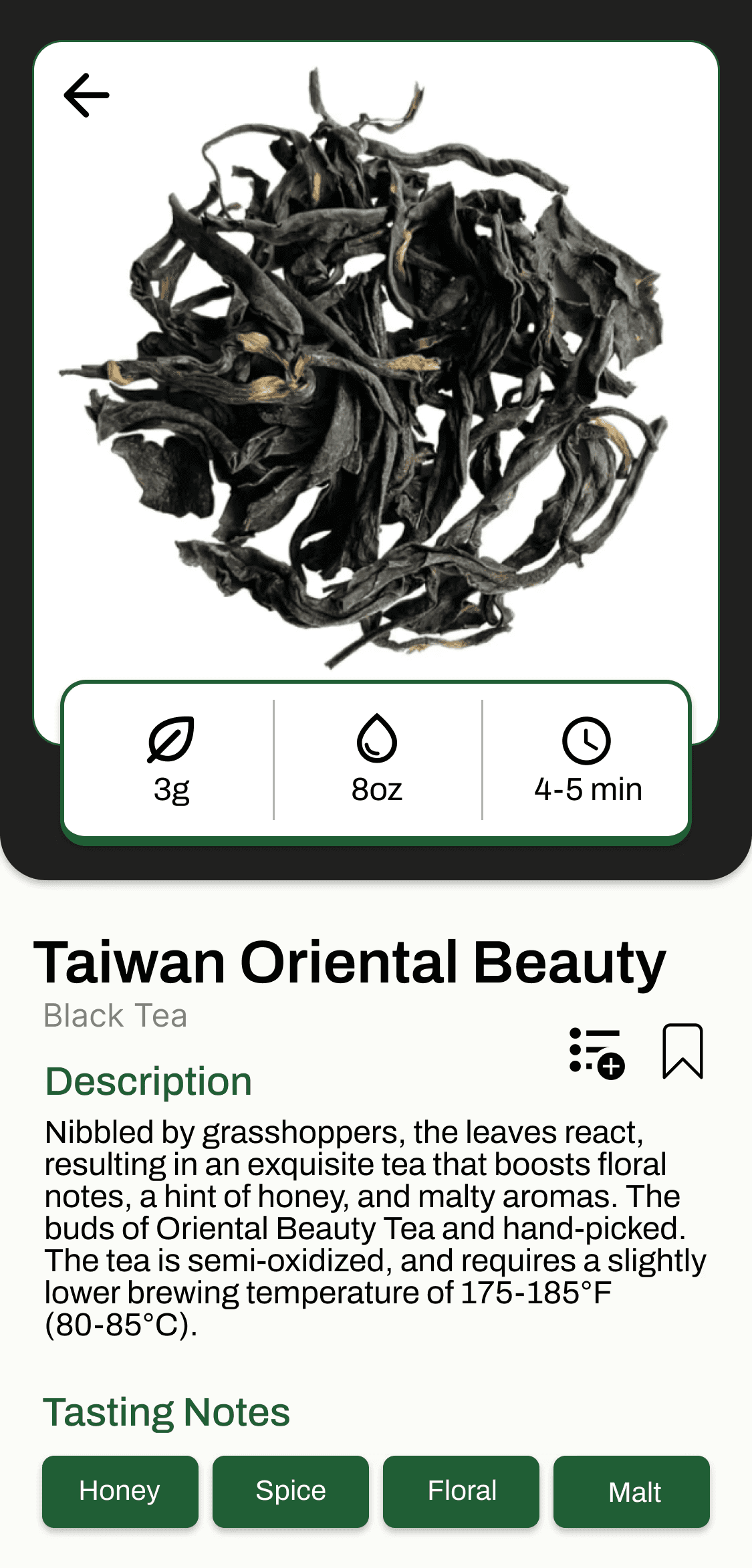
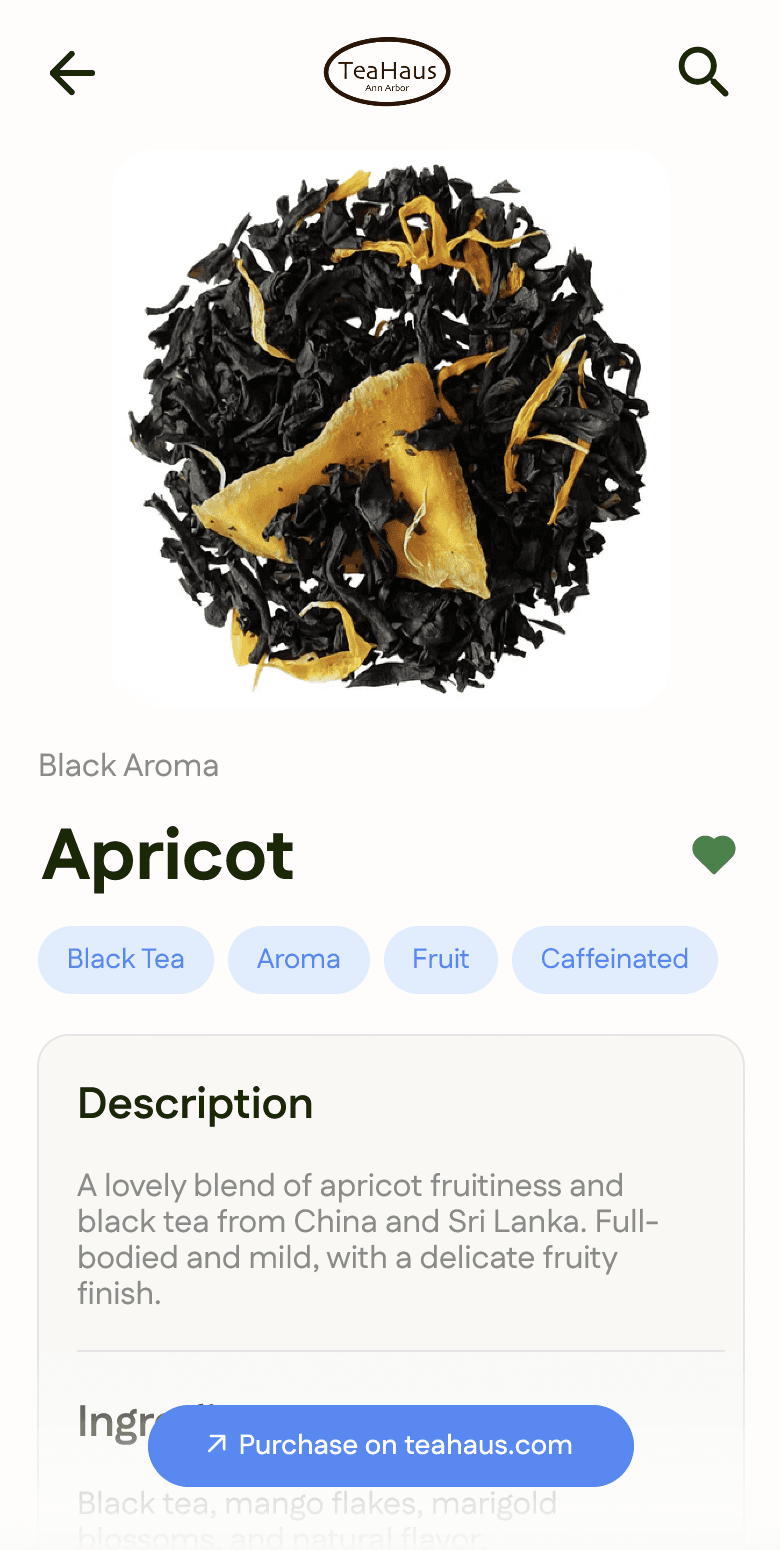
Tea Detail Page
ISSUES
❌ E-Commerce feature is redundant
❌ Cluttered layout
IMPROVEMENTS
✅ External link to purchase on teahaus.com
✅ More effective information organization
✅ Replaced "save" icons to reduce confusion
What am I currently working on?
I'm currently building out the TeaHaus app using Claude Code, combined with my programming knowledge and Figma prototypes. One of the reasons I've iterated on this design multiple times is to use my Figma mockups as a starting point for this exploration! I am learning to overcome hurdles, troubleshoot technicality, and understand how to pull data from teahaus.com to populate the information on each tea card.
After extracting the basic information, my goal is to focus on building out a robust profile page before expanding to other pages while leveraging Claude's help to make visual changes.